Merge. Tone Map. Export.
Stunning HDR.
HDRizer merges your bracketed exposures into stunning HDR images — with auto-alignment, deghosting, tone mapping, and RAW support, all in one native macOS app.
Professional HDR workflow, without the complexity.
Loved by macOS photographers · $8 one-time · Apple Silicon native · Works offline
macOS Native
SwiftUI + C++ + Metal
Offline Ready
No cloud required
- $8 one-time — no subscription
- Apple Silicon + Metal GPU
- 100% offline — no cloud
- RAW: CR2 / CR3 / NEF / ARW / DNG+
THE PROBLEM
Sound familiar?
Ghost artifacts
Moving objects in your brackets leave double-image artifacts. Manual masking takes forever.
Flat HDR results
Your merged photos look washed out or over-processed. Finding the right tone map balance is a guessing game.
RAW headaches
Switching between RAW converter and HDR tool. Export, import, re-export — the round-trip never ends.
Slow processing
Waiting minutes for a single merge on high-resolution files. GPU acceleration shouldn't be an afterthought.
FEATURES
Everything you need for HDR
HDR Merge Engine
Multi-exposure weighted integration
Merge 3–7 bracketed exposures into a 32-bit floating-point HDR radiance map. Recover details from deepest shadows to brightest highlights.
Auto Alignment
Translation · Rotation · Affine
Automatic image alignment corrects handheld shake across multiple exposures. Supports translational, affine, and local warping modes.
Deghosting
Off / Low / Medium / High
Intelligent motion detection eliminates double-image artifacts from moving objects — people, cars, leaves. Adjustable from subtle to aggressive.
Tone Mapping
Filmic · Reinhard · ACES
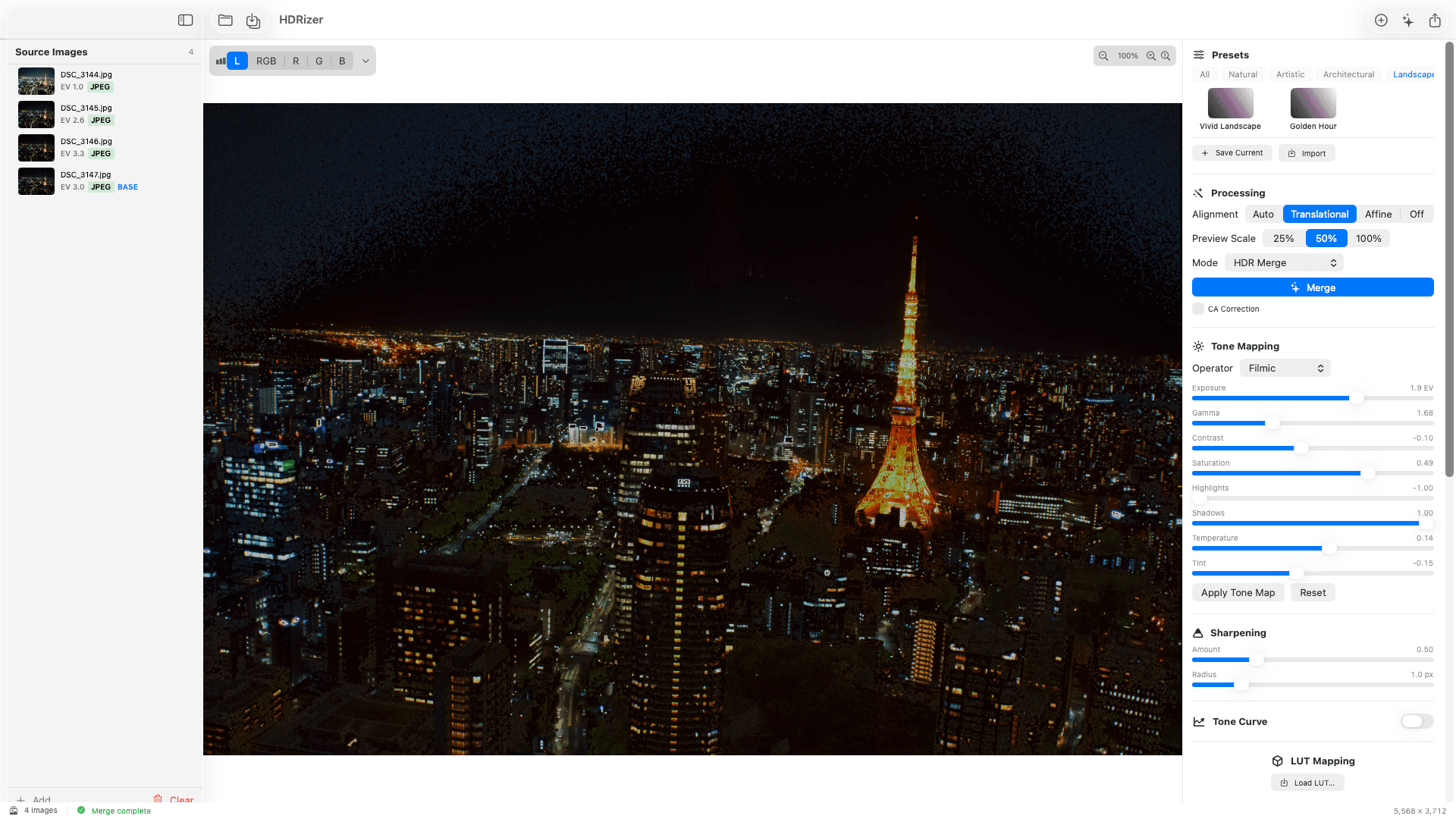
Full tone mapping controls: exposure, gamma, contrast, saturation, highlights, shadows, temperature, tint. Real-time preview at multiple scales.
Preset System
10 built-in + custom presets
Instantly apply looks like Vivid Landscape, Golden Hour, Cinematic, or Dramatic. Save, import, and export your own presets as JSON.
RAW Support
CR2 · CR3 · NEF · ARW · DNG & more
Decode RAW files natively via macOS media adapters. White balance, exposure, and highlight recovery controls built in.
Batch Processing
Folder-based bracket detection
Select a folder and HDRizer automatically groups brackets by timestamp. Process dozens of HDR sets with one click.
Local Adjustments
Brush · Gradient · Luminosity mask
Paint selective adjustments with a brush, or apply linear/radial gradient filters. Luminosity masks target specific tonal ranges.
Flexible Export
JPEG · PNG · TIFF · EXR · DNG
Export in any format you need. 8-bit JPEG for web, 16-bit TIFF for print, 32-bit EXR for compositing. EXIF metadata preserved.
WORKFLOW
Simple 4-step workflow
Import
Drag & drop your bracketed photos — JPEG, TIFF, or RAW. EXIF exposure data is parsed automatically.
Merge
Auto-align, deghost, and merge into a 32-bit HDR radiance map. Choose HDR Merge, Exposure Fusion, or Single Image HDR mode.
Tone Map
Fine-tune with exposure, contrast, highlights, shadows, and color controls. Apply presets or dial in your signature look.
Export
Save as JPEG, PNG, TIFF, EXR, or DNG. Resize, sharpen, and embed EXIF metadata — all in one step.
PRO TOOLS
Advanced editing tools
Histogram & Clipping
Real-time RGB + luminance histogram updates as you edit. Highlight/shadow clipping overlay shows blown areas instantly.
Tone Curve
Cubic Hermite spline tone curve with 256-entry LUT. Fine-tune tonal response with precise control points.
3D LUT Mapping
Import .cube LUT files for cinematic color grading. Trilinear interpolation ensures smooth results.
Chromatic Aberration
Auto-detect and correct R-G and B-G colour shifts at edge pixels. Applied during decode phase for best results.
Lens Correction
Barrel/pincushion distortion, perspective keystone, and vignette correction. Auto-detect lens profiles from EXIF data.
Sharpening
Unsharp mask with controllable amount (0–3×) and radius (0.5–5 px). Per-channel parallelism for maximum performance.
FAQ
Frequently Asked Questions
HDRizer is a macOS-native HDR photo merge app built by Shohei Komatsu (shokoma). It combines bracketed exposures into 32-bit floating-point HDR images with auto-alignment, deghosting (Off/Low/Medium/High), tone mapping (Filmic / Reinhard / ACES), 10 built-in presets, RAW support (CR2, CR3, NEF, ARW, DNG and more), batch processing, local adjustments and export to JPEG / PNG / TIFF / EXR / DNG. One-time $8 purchase, no subscription, fully offline, Apple Silicon + Metal GPU accelerated.
Unlike Aurora HDR or Photomatix, HDRizer is a single-purpose macOS-native app: no subscription, one-time $8, no cloud account, Apple Silicon + Metal-first GPU pipeline, and a focused 4-step workflow (Import → Merge → Tone Map → Export). Algorithms are written in portable C++ for deterministic results, and bracketed sets are detected automatically from EXIF timestamps. Localised in English and Japanese.
HDRizer supports JPEG, TIFF, and PNG for input. RAW formats including CR2, CR3, NEF, ARW, DNG, ORF, RW2, RAF, PEF, and SRW are supported via the macOS media adapter layer. Export formats include JPEG, PNG, TIFF (8/16-bit), EXR (32-bit float), and DNG.
Typically 3–7 bracketed exposures (e.g., -2EV / 0EV / +2EV). HDRizer also supports single-image HDR, which generates pseudo-brackets from a single exposure for quick HDR effects.
HDRizer is a one-time purchase of $8 (or ¥800). There is no subscription and no hidden fees — all future updates are included.
No. HDRizer is a fully offline desktop application. All processing happens locally on your Mac using CPU and Metal GPU acceleration.
Yes. HDRizer is built for Apple Silicon (M-series) first, with Intel best-effort support. Metal compute shaders provide GPU-accelerated processing on both platforms.
Currently macOS only. The core algorithms are written in portable C++ to enable a future Windows port. The architecture was designed from day one with cross-platform portability in mind.
PRICING
Simple, one-time pricing
Pay once, use forever. No subscription, no hidden fees.
Full Access
Pay once. Own it forever. No subscription.
- HDR Merge (3–7 exposures)
- Auto-alignment & deghosting
- Tone mapping with real-time preview
- 10 built-in presets
- RAW support (CR2, CR3, NEF, ARW, DNG…)
- Batch processing (folder-based)
- Local adjustments (brush, gradient, luminosity mask)
- Export: JPEG · PNG · TIFF · EXR · DNG
- All future updates included
- Priority email support
Unleash your brackets.
Auto-align, deghost, and tone map your bracketed photos into professional HDR images. Just $8 — one-time, no subscription.
Download on Mac App Store