Only Gantt.
Nothing else in the way.
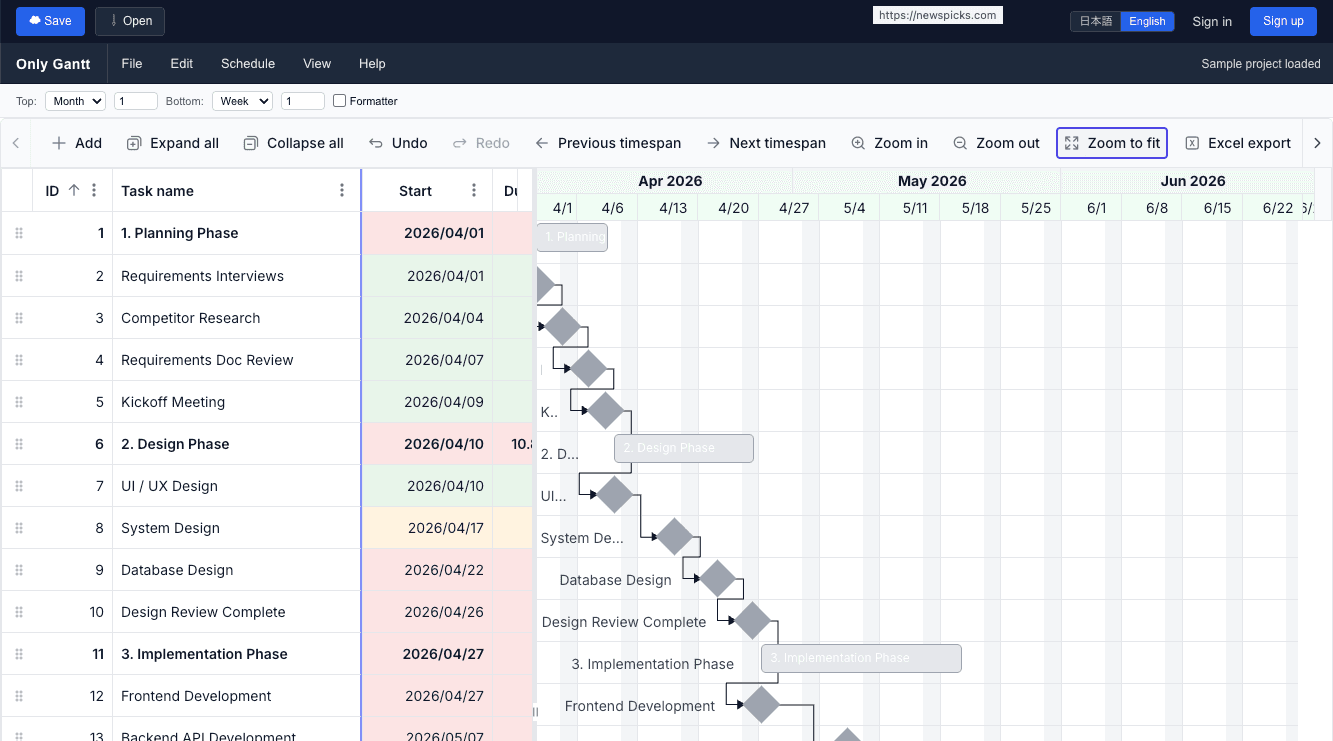
A browser-only Gantt chart service, laser-focused on scheduling. No kanban, no tickets, no bloat — just the most polished Gantt you have ever used.
Sign up and start scheduling in under a minute.
Browser-Only
No install, anywhere
Auto Cloud Save
Saves 3 s after edit stops
10,000
tasks per project
50
projects per account
4
dependency types
Sound familiar?
Tools with too much
80% unusedKanban, tickets, dashboards, BI… you only ever wanted a Gantt chart, but every tool keeps adding features.
Excel Gantt limits
No CPMSpreadsheet Gantts cannot calculate critical paths, do not handle dependencies, and break the moment a date slips.
Manual recalculation
Hours wastedMove one task and you have to re-roll up parents, recheck dependencies, repaint progress bars by hand.
Painful sharing
Always outdatedExporting to PDF, sharing screenshots, emailing snapshots — your team is always reading a stale plan.
Everything a Gantt chart should be
Nine pro-grade capabilities — none of the noise.
Pro-grade scheduling engine
Auto / Manual / Custom per task
Switch each task between automatic, manual, and custom modes. Choose Fixed Unit, Fixed Work, or Fixed Duration task types — exactly like enterprise schedulers.
Full dependency support
FS · SS · FF · SF + offsets
All four predecessor types with lag and lead, including offset notation like 8SS+3. Realistic project networks, modeled correctly.
WBS hierarchy
Auto rollup · Indent / outdent
Parent / child summary tasks with automatic rollups. Reorganize the work breakdown structure with one click — durations and progress recalculate instantly.
Critical path (CPM)
Live recompute on every edit
Zero-slack and negative-slack tasks are detected and highlighted in real time. Pick any color you like for critical bars.
Visual progress
5-stage color coding
Bars shift from gray → red → orange → blue → green as progress moves from 0 % to 100 %. Project health is readable at a glance.
Baseline tracking
Plan vs. actual
Save your initial plan as a baseline and overlay it on the live schedule. Slips and gains are visualized for retrospectives and stakeholder updates.
Timeline & filters
Day · Week · Month · Year
Seven zoom presets plus 20–300 px cell width slider, multi-column sort, menu / Excel-style filters, full-text search, and up to 10-step undo / redo.
Resource view
Group by assignee · Overload alerts
Pivot the chart by resource to see workload distribution. Over-allocations are detected and surfaced automatically.
PDF · Excel · CSV export
A3 / A4 / Letter / Ledger
Branded PDF with header and footer, .xlsx with optional hidden columns, and CSV. Pick paper size, orientation, and theme on the fly.
Get a project on a Gantt in four steps
Sign up
Create an account with email + password or one-click Google sign-in. reCAPTCHA Enterprise blocks bots automatically.
Add tasks
Type tasks into the grid, indent them into a WBS, and link predecessors with FS / SS / FF / SF dependencies and offsets.
Schedule & track
The engine recomputes the critical path on every edit. Bars change color as progress is updated — no manual repainting.
Share or export
Switch projects from the header dropdown, then export to PDF, Excel, or CSV for stakeholders. Auto-save handles the rest.
Built for serious schedules
Segments (split tasks)
Represent work that is paused and resumed inside a single task. No more inflating durations to fake interruptions.
Custom calendars
Configure working days (Mon–Fri), holidays, and working hours (e.g. 9–13 / 14–18). Schedules respect your organization's calendar.
Virtual scrolling
Up to 10,000 tasks render seamlessly. The grid stays smooth even on very large programs.
Auto-saved view state
Column order and width, sort, filter, and splitter position are remembered per device. Reopen and pick up exactly where you left off.
Multi-project workspace
Manage up to 50 projects per account. Switch between them from a dropdown without losing context.
Bilingual UI (EN / JA)
Menus, dialogs, tooltips, and legal pages all translated. Toggle from the header — your preference is remembered.
Authentication & security
Min. 8 chars · Letters + digits required
One-click sign-up and sign-in
Confirmation link sent on sign-up
Email reset · Re-auth on change
Removes all projects, tasks, profile, and credentials
Bot protection (score threshold 0.5)
Firebase Admin SDK ID-token verification
3 s debounce · sendBeacon on tab close · 10 min retry
Free during closed beta
All features are currently free. The plans below describe what is coming after general availability.
Free
Personal projects and small teams
- Up to 3 projects
- All Gantt features
- Critical path & dependencies
- WBS, segments, baselines
- CSV export
- Bilingual UI (EN / JA)
Premium
Power users and growing teams
- Up to 50 projects
- Everything in Free
- PDF & Excel export
- Resource view & overload alerts
- Priority email support
Team / Enterprise
Organizations with shared programs
- Unlimited projects
- Shared / collaborative projects
- SSO
- SLA
- Dedicated support
How Only Gantt compares
The same scheduling power as enterprise tools — without the installation, cost, or bloat.
| Feature | Only Gantt | MS Project | Monday.com |
|---|---|---|---|
| Browser-only, no install | ✓ | Desktop app | Browser |
| Critical path (CPM) | ✓ | ✓ | ✗ |
| All 4 dep types (FS/SS/FF/SF) | ✓ | ✓ | FS only |
| WBS hierarchy & rollup | ✓ | ✓ | Partial |
| Baseline tracking | ✓ | ✓ | ✗ |
| Free plan | ✓ | ✗ | Limited |
| Gantt-only focus | ✓ | ✗ | ✗ |
Comparison based on publicly available feature lists as of 2026. MS Project requires Microsoft 365. Monday.com Gantt is an add-on to a work management platform.
Built for real project teams
Hear from teams who replaced bloated tools with a focused Gantt.
“Finally a Gantt tool that doesn't bury the chart under features I don't need. Critical path updates in real time — that alone is worth the switch.”
“We moved our team off MS Project. Same scheduling power, no installation, runs in any browser. The WBS and dependencies are identical.”
“The baseline tracking and resource view are enterprise-grade. Hard to believe it's free during beta.”
Frequently Asked Questions
Only Gantt is a browser-based service focused exclusively on Gantt charts. It deliberately leaves out kanban, ticketing, BI dashboards, and other features so that the Gantt experience itself can be polished as far as possible.
No. Only Gantt runs entirely in the browser. Sign in from any modern browser on macOS, Windows, or Linux and your data is available instantly.
Each task can run in Auto, Manual, or Custom mode and as Fixed Unit, Fixed Work, or Fixed Duration. All four dependency types (FS, SS, FF, SF) are supported with lag / lead offsets like 8SS+3. The critical path is recomputed live as you edit.
Up to 10,000 tasks per project thanks to virtual scrolling, and up to 50 projects per account. You can switch between projects from a dropdown in the header.
Edits are auto-saved 3 seconds after you stop typing. When you close the tab, sendBeacon flushes any pending changes. If saving fails, a warning banner appears and the app retries for up to 10 minutes.
Branded PDFs with header / footer (A3, A4, Letter, Ledger; portrait / landscape), .xlsx (optionally including hidden columns), and CSV. You can export the full project or just the current view.
Yes. Authentication uses Firebase Authentication with reCAPTCHA Enterprise (score threshold 0.5) and server-side ID-token verification via the Firebase Admin SDK. Account deletion fully wipes your data.
Only Gantt is currently free during the closed beta. After GA, planned tiers are Free (up to 3 projects), Premium (up to 50 projects with PDF / Excel export), and Team / Enterprise (unlimited projects, shared projects, SSO, SLA).
Only Gantt runs entirely in the browser — no desktop installation or Microsoft 365 subscription needed. It supports the same core scheduling features (CPM, all four dependency types, WBS, baselines, resource view) and is free during the closed beta. MS Project is powerful but requires a local install and a paid Office 365 plan.
Monday.com and Smartsheet are general-purpose work management platforms where Gantt is one of many views. Only Gantt is built exclusively for Gantt scheduling, so it offers deeper capabilities: all four dependency types with FS/SS/FF/SF offsets, live critical path recomputation, custom task modes, and baseline tracking — features most general tools lack or charge extra for.
Master the Gantt. Skip the rest.
Sign up and start scheduling in your browser right now. Free during closed beta — no credit card required.
Try Only Gantt