How I Build AI-Enabled Learning Apps
By Shohei Komatsu (shokoma) · February 2026
Why AI + Education?
Studying is one of those activities where the feedback loop is painfully slow. You read, you highlight, you hope you remember. Large-language models (LLMs) change the equation: they can instantly transform raw notes into structured quizzes, flashcards, and explanations — giving learners active recall practice within seconds of uploading their material.
I've built two AI-enabled learning apps — Ace the Test and Learn Addic — each taking a different approach to the problem.
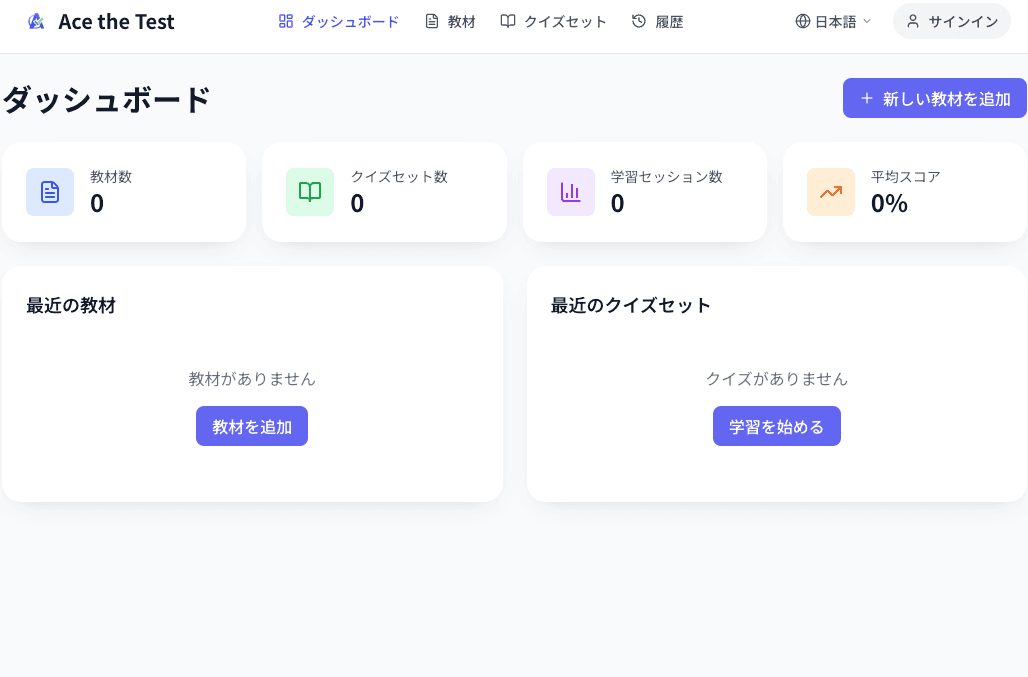
Ace the Test: LLM-Driven Quiz Generation
Ace the Test is a web application that lets you upload notes or PDFs, and then automatically generates multiple-choice (MCQ) and true/false quizzes using a language model. The core workflow:
- User uploads a PDF or pastes plain-text notes
- The backend extracts and chunks the text
- Each chunk is sent to the LLM with a prompt that requests structured quiz output (JSON format)
- Results are parsed, validated, and stored
- The frontend renders an interactive quiz with scoring and review
Architecture
The stack is React + TypeScript on the frontend, backed by Python / FastAPI running on Google Cloud Run. The LLM calls go through a thin abstraction layer so the model provider can be swapped without touching business logic.
Prompt Engineering Lessons
- Structured output — Requesting JSON with a defined schema (question, options, correct answer, explanation) dramatically reduces hallucinated quiz content.
- Chunk sizing — Sending the entire document in one prompt leads to shallow questions concentrated on the beginning. Splitting into 800–1200 token chunks creates a more even distribution of questions across topics.
- Validation loop — Around 5–10% of LLM-generated questions have issues (duplicate options, correct answer not in option list). A post-generation validation step catches and re-generates these before they reach the user.
Learn Addic: Offline-First Study Companion
Learn Addic takes a different angle — it's a native iOS/macOS app built with Swift and SwiftUI, focused on organizing study material with iCloud sync so you can study on any Apple device, online or offline.
Core Data handles local persistence, CloudKit handles sync, and the app uses spaced-repetition scheduling to surface cards when your memory is about to fade. The emphasis is on a fast, fluid native experience rather than a web-first approach.
Key Trade-offs: Web vs. Native
| Ace the Test (Web) | Learn Addic (Native) | |
|---|---|---|
| Platform | Any browser | iOS & macOS |
| Offline | Limited (needs LLM call) | Full offline support |
| AI role | Quiz generation at upload | Spaced-repetition scheduling |
| Sync | Cloud-based (PostgreSQL) | iCloud / CloudKit |
| Update cycle | Continuous deploy | App Store review |
Takeaways
- LLMs are best treated as generators behind a validation layer, not as end-to-end pipelines. Post-generation quality checks are essential.
- Native apps still win for daily-use study tools where offline access, speed, and device integration (notifications, widgets) matter.
- Web apps are better for one-shot workflows like “upload → generate → study” where cross-platform reach matters more than native polish.
- Structured output prompting (requesting JSON schemas) is the single most impactful prompt engineering technique for educational content generation.
Explore Further
Last updated: February 2026