
Design is everything.
Draw+ for Windows runs the core MBSE workflow — requirements, SysML V2 models, tests, and traceability — on a single Windows PC, with AI assistance, for $10 / month.
By default your design never leaves your machine — not the model, and not your AI prompts.
Windows Native
Win32 + Direct2D core
Local-First
Cloud AI off by default
10
Diagram Kinds · 9 SysML + Test
$10
Per Month · One Plan
7
UI Languages
0
Design Bytes Sent by Default
Mind maps on the canvas, Español in the UI
Two additions in this release — one new notation, one new language.
Mind maps
Start from a central idea, branch it into topics, and annotate with callouts and boundaries. Mind maps live on the same canvas as your SysML V2 models, so a brainstorm becomes a model without leaving the tool or exporting anything.
Español
Spanish joins English, 日本語, 简体中文, Deutsch, Français and 한국어, bringing the app to seven UI languages. Pick it on first launch or switch anytime in Settings — menus, dialogs, palette, shape names and logs all follow.
See the AI Co-Pilot in action
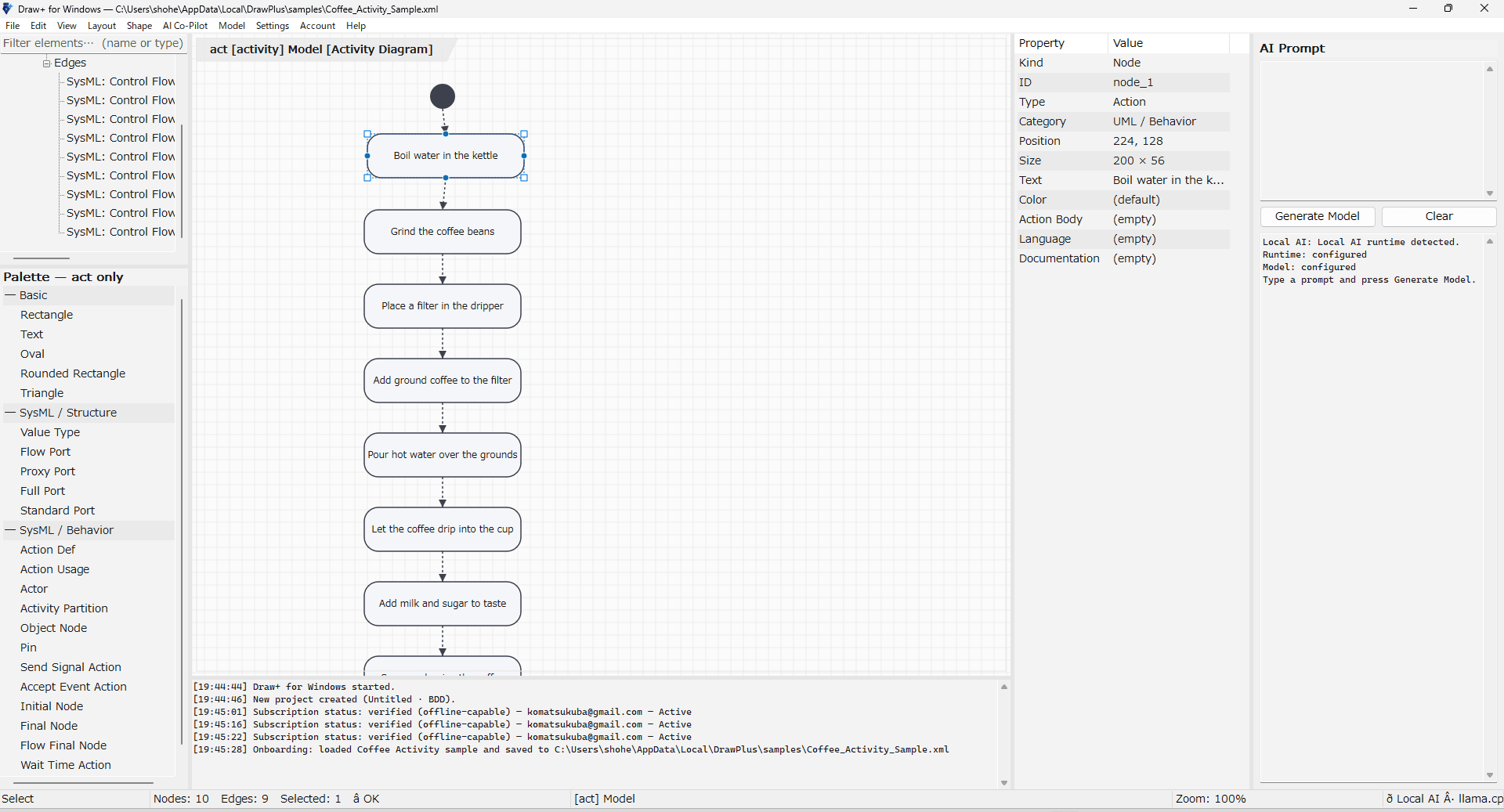
Both diagrams below came from a single prompt. Shown here with the built-in offline interpreter — rule-based, not AI, and free to use with no sign-in. Turn Cloud AI on and the same panel accepts freer wording.
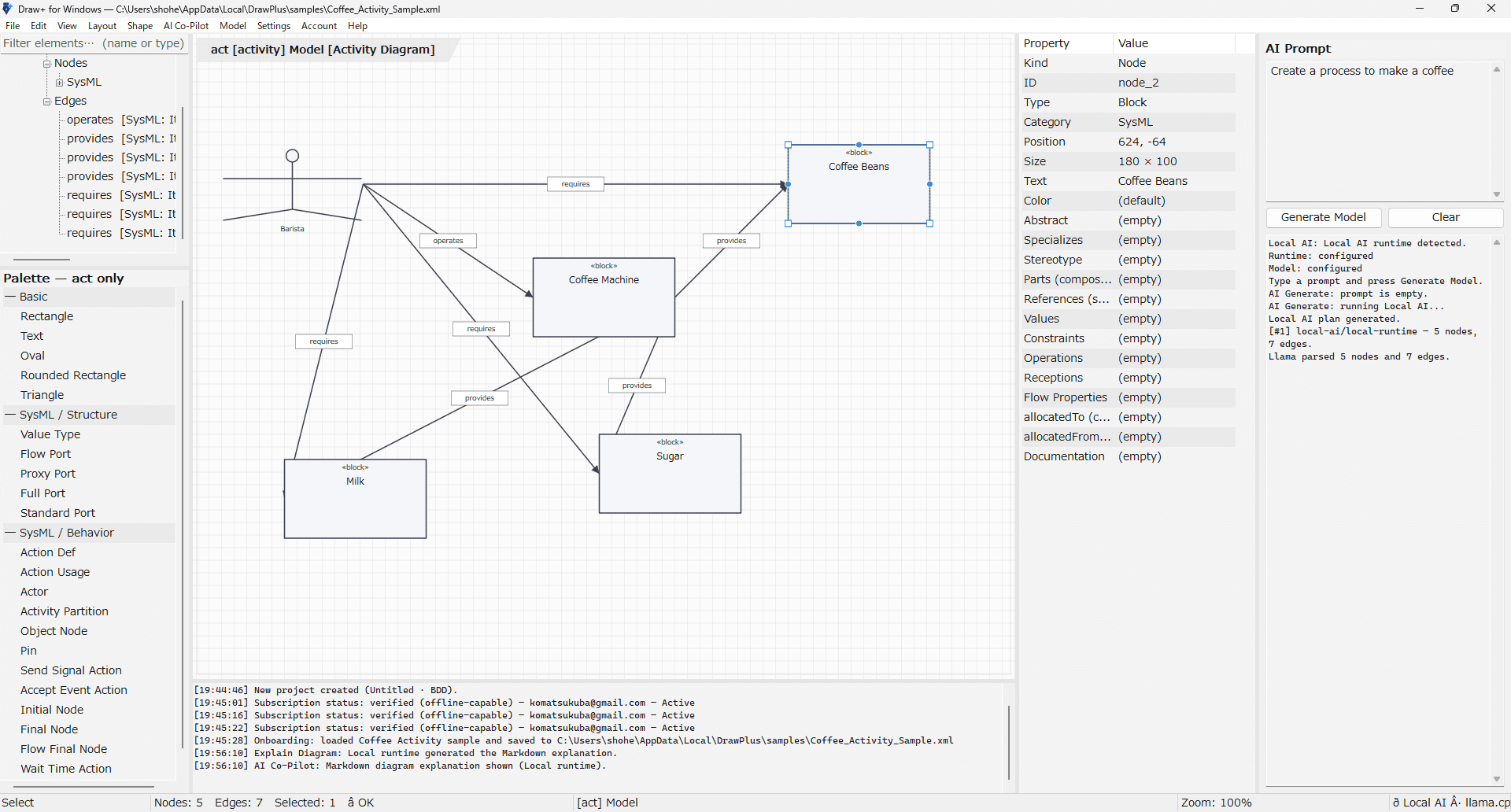
Generate an activity model from one prompt
For example, type "Create a process to make a coffee" and press Generate Model. The Co-Pilot turns your words into an activity model — nodes and typed flows — in seconds. Shown with Cloud AI off, so the rule-based interpreter handled it entirely on your own Windows PC, with no network involved.
Download
Download Draw+ for Windows
Install version 1.0.8 for Windows x64 and start modeling locally. Get it from the Microsoft Store, or download the code-signed installer directly — the same app either way, small enough to finish in seconds.
Installed and kept up to date by the Microsoft Store — no SmartScreen prompt.
Standalone installer, pinned to this exact version.
Installer
DrawPlus-1.0.8-x64-Setup.exe
Version
1.0.8
Platform
Windows x64
Signature
Code-signed (SHA-256)
Those steps apply to the direct installer only. If your browser asks for confirmation, choose to keep the file and run it after the download finishes. The installer is code-signed, but Windows SmartScreen may still show a prompt until the signature accumulates download reputation — choose “More info” ▸ “Run anyway”. Either way, the app picks its language from your Windows display language and falls back to English.
The problem
Four walls that keep teams from MBSE
Cost & approval wall
Enterprise pricingEstablished MBSE suites are licensed per seat, per year, at enterprise price points — hard to get through a budget request for a PoC or an indie project.
Data sovereignty wall
Cloud forbiddenDefense, space, gov and unreleased products often can't upload design models to the cloud at all — ruling out cloud-only tools and mandatory cloud AI.
Tool fragmentation wall
Visio + ExcelDesigns in Visio, requirement-to-test mapping in giant Excel matrices, notes elsewhere — every change means manually re-tracing the impact.
Traceability breakdown
Manual matrixWhen one requirement changes, a human has to chase down every related design and test by hand. Version drift and broken links pile up before delivery.
How it works
From requirements to verified design — in one app
Think → model → link → verify → save. No extra licenses, no cloud requirement.
Model structure & behavior
Lay out Part Defs and Usages on a SysML V2 canvas. The palette auto-filters to the active diagram type, connectors snap to the nearest port, and every new link is created with a semantic type that is valid where you drew it.
Link requirements to tests
Wire requirements to tests with Satisfy / Verify across requirement and test diagrams, then open the coverage and dashboard reports — filterable tables that name the unverified requirements, the orphans and the duplicates, and export straight to CSV.
Save locally, or to your own cloud
Save to a local XML file — Draw+'s own plain-text format — and commit it to Git. Optionally save the very same XML to your own account so you can reopen it from any PC you sign in on.
Features
One native app for the whole MBSE loop
SysML V2 modeling, traceability and AI assistance — local by default.
SysML V2 Native
10 diagram kinds — 9 SysML + test
bdd / ibd / pkg / par / act / sd / stm / uc / req / test — the nine familiar SysML diagram types plus a test diagram of Draw+'s own. Definition–Usage two-layer modeling, cross-cutting allocation, and profiles, stereotypes and viewpoints for your own domain — all on one canvas.
AI Co-Pilot
Cloud AI, strictly opt-in
Generate models from natural language and explain a diagram in Markdown. Generative AI runs in the cloud and stays off until you turn it on. With it off, the same two commands keep working through a built-in, rule-based interpreter that runs in-process with no network — and Draw+ labels that output as not AI-generated, so you always know which one you are reading.
UML · BPMN · Mind Maps
Many notations, one canvas
UML, BPMN, mind maps and basic shapes share the same canvas as your SysML V2 models — from quick brainstorming to rigorous modeling, with no tool-switching.
Simulation
Run the model you drew
Three built-in simulators bring static diagrams to life: activity token flow, sequence timelines, and a parametric constraint solver. Step through behavior and validate the design before writing a line of code.
Requirements ↔ Tests
Traceability you can report on
Requirements, test cases and trace links are read straight off the canvas. Coverage, trace and dashboard reports open as filterable tables — coverage %, verification gaps, orphan and duplicate requirements, project health — and export to CSV.
Valid by Construction
Guided, checked, navigable
The palette narrows to what the active diagram kind allows. While you drag a connector it snaps to the nearest port and turns green, amber or red to tell you whether the link is valid. Anything still wrong gets an inline badge — and a double-click in the log jumps you to the element.
Local-First & Git-Friendly
Win32 + Direct2D
A true Windows-native app — fast, light, instant launch. Files save as plain XML text, so Git handles diff, history and variant branches naturally.
Your Cloud, Optional
Personal account only
Save projects to your own account and reopen them from any PC you sign in on. Same XML as the local file — no second format. The launch list shows local and cloud projects together, and saving needs a subscription while reading your data back needs only sign-in.
Export & Import
Pictures and models
One Export command writes PNG, JPEG, SVG and PDF for deliverables — or XMI and SysML v2 text for model interchange. Import .xmi and .sysml back onto the canvas with structure, connectors and layout intact.
IDE-Style Workspace
Browser · Canvas · Properties
A Rhapsody-style four-panel layout keeps the model browser, canvas, properties editor and output log always in view, on a modern Mica backdrop with a dot-grid canvas and a custom title bar. The inline Properties panel renames, retypes and re-stereotypes any element without opening a dialog.
Seven UI Languages
EN · JA · ZH · DE · FR · KO · ES
English, 日本語, 简体中文, Deutsch, Français, 한국어 and Español — menus, dialogs, palette and logs all follow the language you pick on first launch or change later in Settings.
Signed & Self-Updating
Verified installer
Every executable that reaches your PC is code-signed with SHA-256, chaining to a Microsoft Trusted Root CA, and the installer supports unattended installation. The app checks for updates itself and verifies each downloaded installer against an EdDSA signature before applying it.
Modeling depth
A real modeling tool, not a shape library
Anything can draw a box. What makes a diagram a model is whether the tool knows what the box means, what may connect to it, and what breaks when it changes. Draw+ was built against the standard SysML reference — reviewed chapter by chapter, gap by gap.
The full diagram taxonomy
All nine SysML diagram kinds — package, block definition, internal block, parametric, activity, sequence, state machine, use case and requirement — plus a product test diagram, each with its own element set, connection rules and validator.
Chapter-by-chapter conformance
Each diagram kind was audited against the standard SysML reference text and the gaps were closed one at a time — notation, allowed elements, endpoint rules, control-node arity and the documented pitfalls for each kind.
Cross-cutting allocation
Allocation is classified across all five kinds — requirement, functional, flow, structural and property — and distinguished by definition, usage or asymmetric level. Circular, redundant and nonsensical allocations are reported as problems.
Customize SysML for your domain
Model libraries, stereotype and metaclass definitions with extensions, profiles, multiple applied stereotypes, and views and viewpoints with stakeholders, concerns, method and presentation.
Model interchange, not just pictures
Export the model itself as OMG XMI 2.1 or SysML v2 text, and import .xmi and .sysml back onto the canvas — structure, connectors and layout preserved, not flattened into loose shapes.
Measure the model itself
An MBSE assessment scores the whole model, not one diagram: element and relationship counts, how many of the four pillars carry content, and satisfy, verify and allocation coverage across every requirement and behavior.
Every check above runs in the C++ core, in-process and offline. Validation results are deterministic — the same model always produces the same findings, which is what makes them worth attaching to a design review.
AI transparency
Assistance that works where the cloud isn't allowed
Most tools make AI a reason to send your design somewhere else. Draw+ keeps generative AI in the cloud and switched off, and keeps every command working while it is off.
Rule-based and offline by default — and Draw+ says so
With Cloud AI off, prompts are handled by a deterministic rule-based interpreter compiled into the app: no network, no GPU, no multi-gigabyte model to download. It is not an AI model, and Draw+ labels its output accordingly — so the same model always yields the same suggestions, and you always know they did not come from an AI.
Cloud AI is strictly opt-in
Off by default. The first time you use it, an explicit consent dialog tells you your prompt and current model would be sent to an external Cloud AI service — and you can switch it off again anytime from the AI menu.
Capped at 20 requests / day
When Cloud AI is on, it is limited to 20 requests per day per user. The limit is enforced on the server, not just in the app, so usage and cost stay bounded and predictable.
Always falls back — and always tells you
Turned off, capped out, offline, or a request failed? Draw+ falls back to the built-in rule-based interpreter and tells you on screen that the result is not AI-generated — so assistance keeps working, and you always know which engine produced what you are looking at.
The product interface never names an AI vendor. The specific provider is disclosed only where the law expects it — our privacy policy, terms of use, and specified commercial transactions notice. Wherever an AI result appears, there is a built-in way to report output you consider inappropriate.
Local first · Cloud optional
You decide where your models live
The local file is the default and complete path. Cloud is an optional layer that only exists once you create an account — and it holds your projects, not a team's.
On your PC — always
- Plain XML text on your own disk
- Diff, branch and commit it with Git like source code
- Works with no network at all, including air-gapped setups
- The default path — nothing else has to be switched on
In your cloud — if you want
- Save projects under your own account, not a shared workspace
- Reopen them from any PC where you sign in with that account
- Byte-identical XML to the local file — no second format
- Your launch list shows local and cloud projects side by side
- Saving needs an active subscription; reading and deleting your own data needs only sign-in
Deliberately not built
- Multi-user sync, shared workspaces or co-editing
- Comments, review and approval flows
- Public share links or a web viewer
- Background syncing, polling or conflict merging
- Automatic uploads — every cloud write is your explicit action
- Automatic downloads — the one call you don't press is a metadata-only project list at launch, only when signed in, and you can switch it off
Capabilities
Everything that ships in Draw+ today
One native Windows app — local by default, everything included in one price.
Windows-native Direct2D editor with a Rhapsody-style IDE layout (Browser / Canvas / Properties / Output)
SysML V2-native modeling across 10 diagram kinds — the nine SysML diagram types plus Draw+'s own test diagram (bdd / ibd / pkg / par / act / sd / stm / uc / req / test)
Definition / Usage two-layer modeling with a methodology-aware palette that auto-filters elements and relationships
Plain-text XML serialization that Git can diff — plus a KerML text view of the current diagram, and SysML v2 text (.sysml / .kerml) export for interchange
Per-diagram methodology validators covering notation, allowed elements, endpoint rules and control-node arity
Magnet connectors — drop anywhere on a node and the link snaps to the nearest port, with hover dots showing where connections can land
Live connection feedback while dragging: green for valid, amber for a duplicate link, red for one the diagram kind forbids
New connections are created with a semantic relationship type that is valid on the active diagram, never a meaningless line
Inline problem badges on offending elements, and a double-click in the output log that selects and centers the element it names
Cross-cutting allocation analysis — five allocation kinds, definition / usage / asymmetric levels, and circular, redundant and invalid-target detection
Domain customization — model libraries, stereotype and metaclass definitions, profiles, multiple applied stereotypes, views and viewpoints
UML diagrams — structure / behavior / interaction / common
BPMN diagrams — events / activities / gateways / organization / data
Mind maps — central idea, topics, callouts, boundaries
Basic shapes & connectors (rectangle / oval / rounded / triangle / text / arrows)
Activity token-flow simulation
Sequence timeline simulation (replay message exchanges on a time axis)
Parametric constraint solver (solve constraints and propagate values)
Requirements & test-case tables read from the canvas, with trace links (Satisfy / Verify / DeriveReqt / Refine / Trace / Copy)
Verification coverage report with per-requirement gap analysis, plus a trace-link table across every requirement and test
Dashboard report — inventory, requirement coverage, verification progress, traceability counts, quality indicators (orphans, duplicates, missing fields) and an overall project-health summary
MBSE assessment across the whole model — element and relationship counts, pillar breadth, and satisfy / verify / allocation coverage
Every report table is live-filterable and exports to CSV, TSV or plain text
Requirements CSV import and export — bring an existing requirement list in from Excel and take it back out
AI Co-Pilot — natural-language model generation through Cloud AI (opt-in, off by default, 20 requests/day per user, enforced server-side), with a rule-based offline interpreter as the always-available fallback
Explain Diagram (AI Markdown summary) and Human-in-the-Loop suggestions you accept or reject
Built-in way to report inappropriate AI output, reachable from the places AI results appear
Layout & arrangement — align / distribute / rotate / flip / z-order / group / snap-to-grid / auto-layout
Orthogonal elbow connector routing that respects port normals
Command Palette (Ctrl+K) & Quick Shape Insert (Shift+Space)
One unified Export (Ctrl+E) to PNG / JPEG / SVG / PDF for deliverables, or XMI / SysML v2 text for model interchange
Model import — bring .xmi and .sysml files back onto the canvas with structure, connectors and layout preserved
Local XML save with Git-friendly history, plus optional personal-account cloud save and a launch list that shows both
Seven UI languages (English / 日本語 / 简体中文 / Deutsch / Français / 한국어 / Español) with a first-launch picker and Settings switch
Modern / Dark / Classic themes with a Mica backdrop, dot-grid canvas, custom title bar and Win11 Fluent type ramp
Inline Properties panel — edit name, type, stereotype, multiplicity and custom tags without opening a dialog; changes propagate instantly
Code-signed (SHA-256) installer chaining to a Microsoft Trusted Root CA, with unattended-install support and a localized setup wizard
Built-in update check that verifies each downloaded installer against an EdDSA signature before applying it
Why Draw+
A third option the market was missing
Not 'powerful but expensive and cloud-only', not 'cheap but can't do MBSE'. Draw+ owns the desktop × MBSE whitespace — for $10 a month.
Testimonials
What customers tell us
Solo builders, secrecy-bound engineers, and cost-conscious teams.
“I work fast, and traceability was always the part I skipped. Now the requirement, the diagram and the test link up as I go — and none of it leaves my laptop.”
Solo Developer
Indie Hacker
SoloSynergy Lab“We're air-gapped, so most tools are ruled out before we even get to a demo. Draw+ just ran. Full SysML V2, no network, nothing to justify to the security team.”
Systems Engineer
Confidential design
Manufacturing“The proper suites were never going to clear our budget, so we lived in Excel and Visio. With Draw+ we had a proof of concept running the same afternoon.”
Consultant
Partner
ConsultingPricing
One plan. $10 a month.
No tiers, no per-seat quotes. Every feature is free to use; the subscription is what saves and exports your work.
Free to use
Every feature stays usable for as long as you like
- Draw SysML V2, UML, BPMN & mind maps
- AI Co-Pilot — Cloud AI free to try, 20 requests/day, off until you enable it
- Explain diagrams & generate models from text
- Requirements ↔ test traceability
- Works fully offline — no sign-in
- Saving and exporting require a subscription
Draw+ Subscription
Unlock saving and exporting your work
- Everything in the free tier
- Save models to local XML, Git-ready
- Optional cloud save under your own account
- Coverage, dashboard & MBSE assessment reports
- Export report tables to CSV
- Export to PNG / JPEG / SVG / PDF, XMI & SysML v2
- Cancel anytime via Stripe portal
FAQ
Frequently Asked Questions
Yes. Draw+ for Windows is local-first by design. Modeling, validation, traceability, simulation, local saving and the built-in rule-based prompt interpreter all work with no network. The network is used only for sign-in and subscription checks, for cloud save if you use it, and for Cloud AI if you opt in. It runs in air-gapped environments.
By default, on your PC as local XML text files — nothing is uploaded. Because it's text, you can version, diff and branch it directly with Git. If you sign in, you can additionally save projects to your own account and reopen them on another PC. That cloud copy is byte-identical XML, lives only under your account, and is never shared with anyone else.
Not by default. With Cloud AI off, prompts are handled by a deterministic rule-based interpreter compiled into the app — it runs in-process, needs no network and sends nothing out. It is not an AI model, and Draw+ tells you so wherever its output appears. There is no bundled language model to download, which is why the installer is only about 4 MB. Cloud AI is off out of the box; the first time you use it, a consent dialog explains that your prompt and current model would be sent to an external Cloud AI service, and you can turn it back off anytime from the AI menu. Whenever Cloud AI is off, capped, offline or failing, Draw+ falls back to that offline interpreter and labels the result as not AI-generated.
Cloud AI is capped at 20 requests per day per user, and the cap is enforced on the server rather than only in the app, which keeps usage and cost predictable. The built-in offline interpreter is not capped — when you reach the daily limit, Draw+ continues with it instead of stopping, and marks that output as not AI-generated.
Once, and only if you are signed in: at launch it fetches a metadata-only list of your own cloud projects so they appear in the start list next to your local ones. It is a list of names and timestamps — no project content is downloaded until you actually open a row, and nothing is ever written without you pressing something. It runs on a background thread so it can't delay startup, and there is a checkbox on the start page to turn it off. If you never sign in, or you switch it off, Draw+ makes no cloud calls at all.
Draw+ is free to use for as long as you like, with no sign-in and no time limit. What the $10/month subscription unlocks is persistence: saving models (locally or to your own account) and exporting — pictures, model interchange files and report CSVs.
You keep access to them. Saving new versions to the cloud requires an active subscription, but listing, opening, downloading and deleting your own projects only requires you to be signed in. A cancelled subscription never locks you out of data you already saved.
Yes. Purchase and cancellation happen through Stripe's hosted Checkout and Customer Portal in your browser. You can cancel yourself anytime; the app never stores your payment details.
Draw+ is built specifically for individual developers. It does not provide team management, co-editing, shared workspaces, organization accounts or RBAC. Cloud save is per-person: your projects live under your own account only. It's a simple, single account for one person.
Seven: English, 日本語 (Japanese), 简体中文 (Simplified Chinese), Deutsch (German), Français (French), 한국어 (Korean) and Español (Spanish, added in 1.0.8). You pick one on first launch and can change it anytime in Settings; menus, dialogs, palette, shape names and log messages all follow. The installer also picks its language from your Windows display language, falling back to English.
SysML V2 across 10 diagram kinds (bdd / ibd / pkg / par / act / sd / stm / uc / req / test — the nine SysML diagram types plus Draw+'s own test diagram) plus UML, BPMN, mind maps and basic shapes, all on the same canvas.
Draw+ was reviewed against the standard SysML reference text one chapter at a time — package, block definition, internal block, parametric, activity, interaction, state machine, use case and requirement diagrams, plus cross-cutting allocation and domain customization. Each review compared the notation, permitted elements, endpoint rules and documented pitfalls of a diagram kind against the implementation, and the differences were closed. What you get from that is practical rather than academic: the palette only offers elements that belong on the diagram you are editing, and the validator explains, per element, why something doesn't.
Yes. Allocations are classified across all five kinds — requirement, functional/behavioral, flow, structural and property — and separated by level, so a definition-level allocation is distinguished from a usage-level or asymmetric one. Draw+ also checks the allocations themselves: self-allocations, circular chains, redundant duplicates and nonsensical targets are reported as problems alongside the rest of the diagram's validation results.
Yes, using SysML's own extension mechanism. You can define stereotypes and metaclasses with extensions and required flags, organize them into profiles, apply several stereotypes to a single element, collect reusable elements into model libraries, and define views and viewpoints with stakeholders, concerns, method and presentation. This is the language-level profile mechanism — Draw+ does not sell industry compliance packs.
Two reports do this from different angles. The dashboard report covers a project's traceability health — coverage percentage, verification progress, relationship counts, plus quality indicators like orphan requirements, duplicate IDs and missing fields. The MBSE assessment scores the whole model instead of one diagram: element and relationship counts, how many of the four modeling pillars actually carry content, and satisfy, verify and allocation coverage. Both are deterministic and computed locally, and every table exports to CSV.
No. Draw+ is a Win32 + Direct2D native app — not Electron — so it's light and launches instantly. A C++ core engine keeps large models smooth to edit, and because the default prompt engine is a rule-based interpreter compiled into the app rather than a bundled language model, the installer itself is only about 4 MB.
MBSE (Model-Based Systems Engineering) is an engineering approach that uses formal models — rather than documents alone — as the primary artifact throughout a project lifecycle. A specialized tool matters because it enforces correct SysML notation, maintains live traceability between requirements, models, and tests, and can simulate behavior directly on the model. Draw+ for Windows covers SysML V2 modeling, requirements traceability, simulation, and AI assistance in a single local-first Windows app for $10/month.
Draw+ for Windows and IBM Rhapsody both support SysML V2 modeling and requirements traceability, but differ sharply in cost, deployment, and scope. Rhapsody and Cameo are enterprise suites, licensed per seat per year at enterprise price points and bought through a procurement process — check each vendor's current list price for exact figures; Draw+ is a flat $10/month with no per-seat pricing. Rhapsody requires cloud connectivity or large enterprise infrastructure; Draw+ is local-first and works in air-gapped environments. Draw+ is designed for individual engineers who need affordable local MBSE without a multi-year procurement process.
SysML v2 is the latest OMG standard for systems engineering modeling. It replaces SysML 1.x with a cleaner, text-first kernel called KerML. Draw+ gives you 10 diagram kinds: the nine familiar SysML diagram types — Block Definition (bdd), Internal Block (ibd), Package (pkg), Parametric (par), Activity (act), Sequence (sd), State Machine (stm), Use Case (uc) and Requirement (req) — plus a Test diagram (test) of its own for test-case models, each with a methodology-aware palette and validation. Underneath, elements follow the SysML v2 Definition–Usage model and export as SysML v2 text (.sysml / .kerml).
Draw+ provides requirements-to-test traceability and verification coverage reporting that are directly relevant to safety-critical workflows under ISO 26262, DO-178C, IEC 62304, and similar standards. Draw+ does not ship compliance checklists, standard-specific annex output or evidence packages, and the application is not a certified or qualified tool — using it in a formal certification context requires your organization to perform tool qualification independently. What it does give you is the requirement, model and trace structure those standards expect: Satisfy and Verify links, gap analysis, and Git-versioned model history.
Yes. A single Export command (Ctrl+E) writes either pictures — PNG, JPEG, SVG, PDF — or models: OMG XMI 2.1, and SysML v2 text (.sysml / .kerml). You can import .xmi and .sysml files back onto the canvas, and the round trip preserves structure, connectors and diagram layout rather than flattening it into loose shapes.
Draw+ saves models as plain XML text files in its own format (.xml). The format is human-readable, so you can open model files in a text editor, diff them with standard tools, and commit them directly to Git — version history, branching and merging work exactly like source code, with no proprietary binary format and no cloud sync required. For standards-based interchange, Export (Ctrl+E) writes OMG XMI 2.1 or SysML v2 text (.sysml / .kerml).
Yes. Leave Cloud AI off (its default) and skip cloud save, and the application runs entirely without network access — modeling, validation, simulation, rule-based prompt assistance and local file saving all work offline. The subscription status is cached locally, so brief connectivity is needed only for renewal checks. Day-to-day modeling is fully air-gapped compatible.
Code generation is on the roadmap but is not available in version 1.0.8. The current release focuses on SysML V2 modeling, requirements traceability, three built-in simulators (activity token flow, sequence timelines, parametric constraint solver), and AI assistance. You can export diagrams and models to PNG, JPEG, SVG, PDF, XMI and SysML v2 text for documentation, interchange and client deliverables.
The copy you download from this page checks for updates itself and can install them for you. Every downloaded installer is verified against an EdDSA signature before it is applied, so an update that has been tampered with is rejected rather than run. A copy installed from the Microsoft Store is updated by the Store instead, on the schedule Windows uses for your other Store apps.
Both channels ship the same application, so pick whichever fits how you manage software. The Microsoft Store installs and updates Draw+ for you and never shows a SmartScreen prompt. The direct installer is a standalone, code-signed .exe pinned to one exact version — the better fit for offline machines, for a controlled rollout, and for keeping a copy of the artifact you deployed.
KerML (Kernel Modeling Language) is the foundational semantic layer underlying SysML V2. It defines the core constructs — types, features, relationships, and behaviors — that SysML V2 diagrams are built on. Draw+ can show the current diagram as KerML text, and export the model as SysML v2 text (.sysml / .kerml) for tools that read the OMG standard directly.
Draw+ for Windows currently runs on Windows 10 and Windows 11 (64-bit). A separate macOS edition of Draw+ is also available. Linux support is not currently planned.
No more reasons to give up on MBSE.
Requirements to design and verification — end to end, inside your Windows PC.